Visual Schema Designer
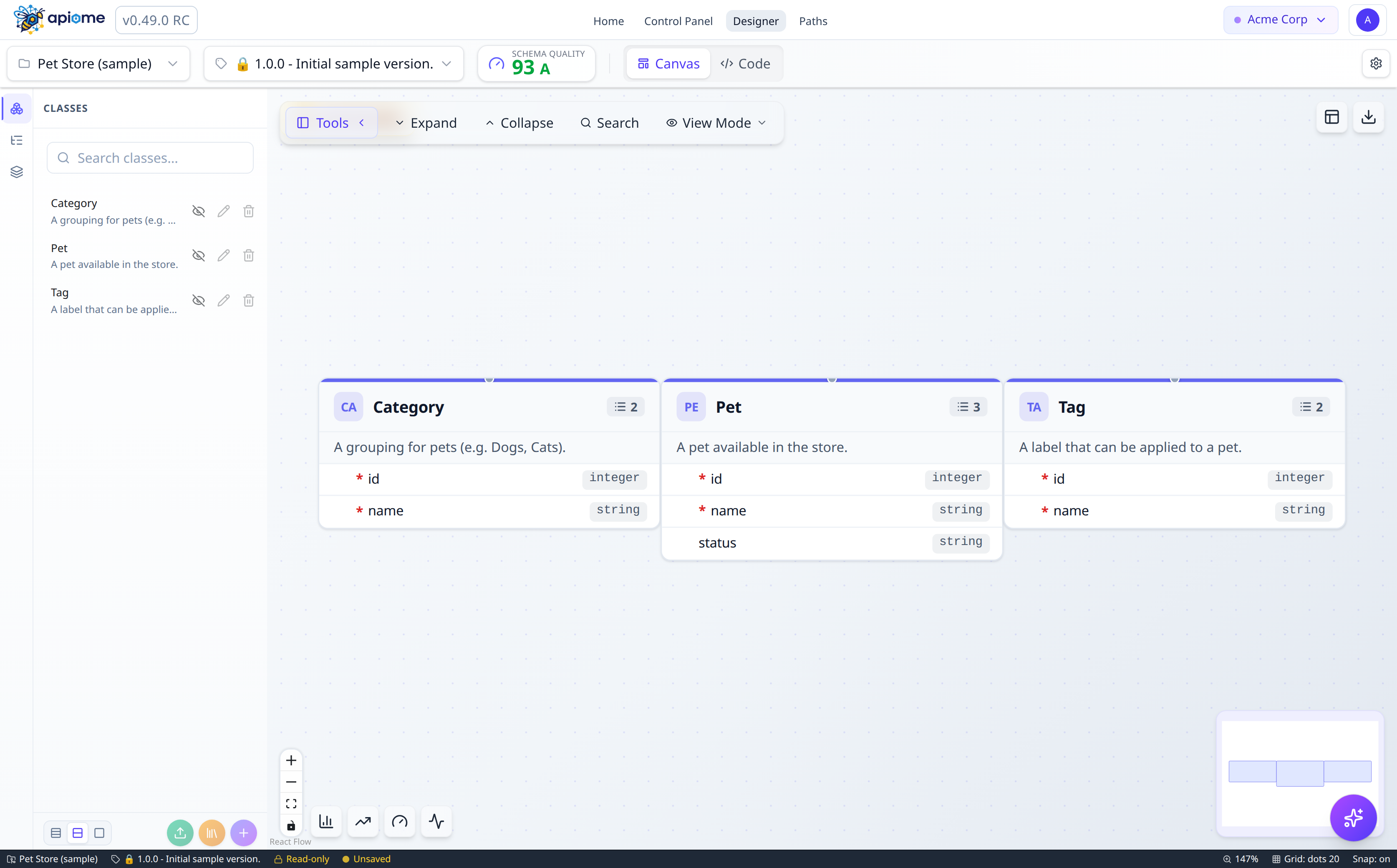
Design data models on an interactive canvas with drag-and-drop simplicity. See relationships, constraints, and dependencies at a glance — no YAML editing required.
- Drag-and-drop class creation with property editors
- Smart auto-layout algorithms
- Color-coded groups with collapsible containers
- Real-time relationship visualization with animated edges
- Version comparison with side-by-side diff highlighting
- 10+ canvas themes including dark mode and blueprint
- Canvas export to PNG, SVG, PDF, Mermaid, PlantUML, and more
- Quality scoring with completeness and consistency grades
Visual API Path Authoring
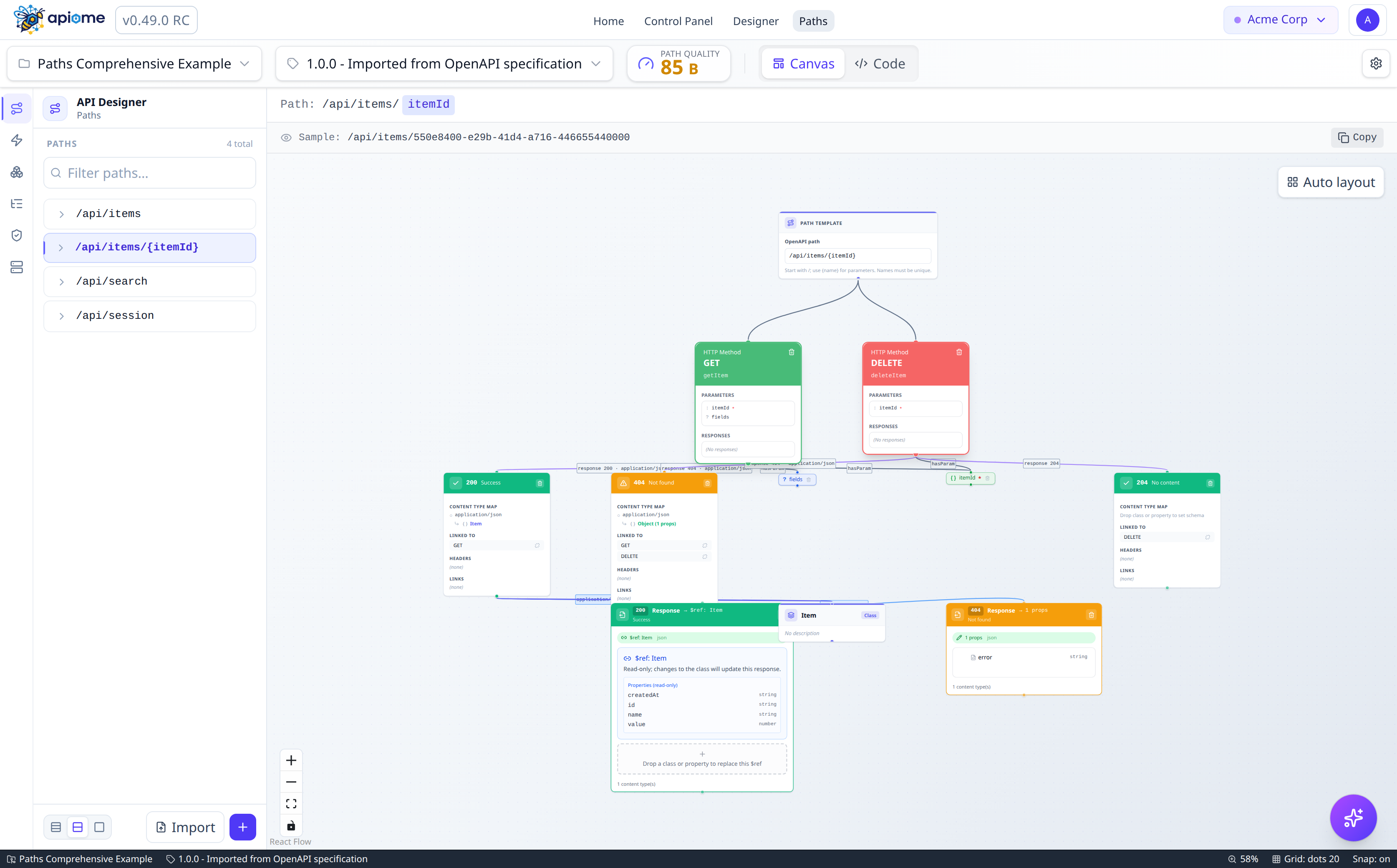
Design every endpoint visually — operations, parameters, request bodies, responses, and security schemes — all on a dedicated developer-focused canvas with HTTP method color coding and real-time OpenAPI validation.
- HTTP method nodes with GET, POST, PUT, PATCH, DELETE color coding
- Drag-and-drop parameters, responses, and schema bindings
- Multi-content-type support (JSON, XML, multipart/form-data)
- Inline schema editing with class reference ($ref) binding
- Response status code color bands (2xx, 3xx, 4xx, 5xx)
- Security scheme configuration (API Key, Bearer, OAuth2)
- Smart edge routing with animated data flow visualization
- Auto-generate CRUD operations from existing schemas
Import almost anything from Anywhere
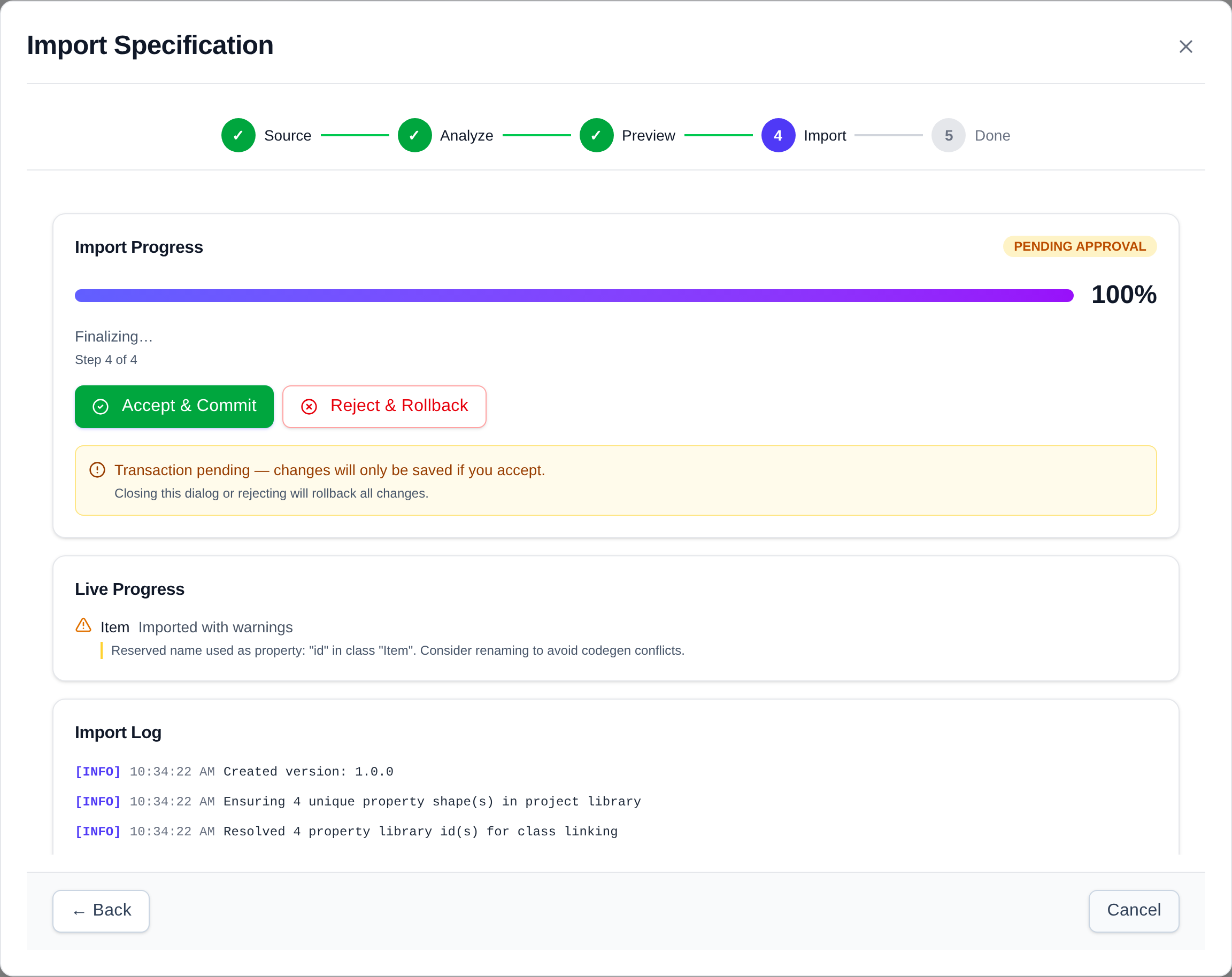
Bring your existing API specifications into Apiome with a guided, multi-step import wizard. Pull from file upload, URL fetch, clipboard paste, Git cloning, SwaggerHub, Postman collections, live MCP servers, or AI-generated specs — spanning REST, RPC, event-driven, GraphQL, data-schema, and AI-agent formats — and see exactly what an import will create, with a lint grade and ranked findings, before anything is written.
- OpenAPI 3.2 / 3.1 / 3.0, Swagger 2.0 / 1.2, JSON Schema, AsyncAPI 2.x / 3.x, GraphQL, and gRPC / Protobuf
- Google API Discovery, Kubernetes CRDs, Kong, OData, LLM tool schemas, and .http / cURL request files
- Pre-commit preview: full entity inventory with a source-to-catalog projection graph
- Re-import deltas against the current revision — including an explicit no-op verdict
- Pre-flight quality gate with A–F grade and ranked findings
- Git import from GitHub, GitLab, and Bitbucket — single files or registered repositories scanned on a cadence
- SwaggerHub, Postman v2.0 / v2.1 collections, MCP server discovery, and AI-powered import
- Same pre-flight verdicts from the CLI with non-zero exit codes, so CI can gate on them
Every source, one catalog
Bring in APIs however they live today — from a file on disk to a running server — across every major paradigm. The wizard detects, normalizes, previews, scores, and quality-gates each one before a single byte is written to your catalog.
Where you import from
File Upload
Drop or browse for a spec file
URL Fetch
Pull a spec straight from a URL
Clipboard Paste
Paste raw JSON or YAML content
Git Repository
GitHub, GitLab, Bitbucket — one spec or a whole repository
SwaggerHub
Public and private SwaggerHub APIs
Postman Collection
Postman v2.0 and v2.1 collections
MCP Server
Discover a live MCP endpoint
AI Generation
Describe your API in plain English
What you can import
OpenAPI 3.2 / 3.1 / 3.0
REST APIs — the modern OpenAPI standard
Swagger 2.0 / 1.2
Legacy REST API descriptions
JSON Schema
Standalone data-model schemas
AsyncAPI 2.x / 3.x
Event-driven and streaming APIs
GraphQL
SDL or live endpoint introspection
gRPC / Protobuf
.proto files or server reflection
Google API Discovery
Discovery documents for Google-style REST APIs
Kubernetes CRDs
CustomResourceDefinition structural schemas
LLM Tool Schemas
Function-calling tool bundles from AI agents
HTTP Request Files
.http / .rest files and cURL commands
80+ More Formats
RAML, TypeSpec, WSDL, OData, Kong, AWS API Gateway, Azure APIM, Apigee, Smithy, OpenRPC, Thrift, Avro, CloudEvents, XSD, ODCS data contracts, TypeScript and Pydantic types, FHIR, EDI X12, COBOL copybooks, and more
Complete platform capabilities
Every tool you need to design, validate, export, and collaborate on APIs — in one place.
Interactive Canvas
Drag-and-drop schema design with smart auto-layout, grid snapping, minimap navigation, and zoom controls.
Paths Designer
Visual endpoint authoring with HTTP method color coding, parameter editing, and response schema binding.
Multi-Source Import
Import from file, URL, clipboard, Git, SwaggerHub, Postman, MCP servers, or AI — and preview the full inventory of what an import will create before anything is written.
Convert to Projects
Turn any catalog item into an OpenAPI project with one conversion, with a record of what was carried over, inferred, or dropped.
Published & Sunset Timeline
See every published version in one place, and plan each one’s deprecation and sunset dates on a shared timeline.
Pre-Flight Quality Gates
Every import and export candidate is linted and graded before it commits — with ranked findings, a workspace lint posture, and matching CLI exit codes for CI.
Schema Test Bench
Validate real payloads against any schema with path-anchored errors, generate valid samples and deliberately invalid mutants, and prove a spec’s own examples conform.
Multi-Tenant Architecture
Organize projects in isolated workspaces with per-workspace members, roles, and granular permission controls.
Version Control
Full version history with side-by-side comparison, diff highlighting, and semantic change tracking.
Any-to-Any Transcoding
Import 97 API formats and emit 53 — OpenAPI to Protobuf, GraphQL to JSON Schema — with per-entity fidelity evidence for everything retained, inferred, or dropped.
10+ Canvas Themes
Light, dark, high contrast, blueprint, whiteboard, solarized, nord, and more — switch instantly.
Relationship Visualization
Animated edges with smart routing, cardinality labels, and constraint badges for clear data flow.
Rich Export Options
Export any version to 53 API formats from its Export dialog, and export canvases to PNG, SVG, PDF, Mermaid, PlantUML, GraphML, DOT, or raw JSON.
Canvas Search
Find any class or property instantly with Cmd+F search, regex support, and result highlighting.
Granular RBAC
Built-in Owner, Admin, Editor, and Viewer roles per workspace, with a resource-by-action permission matrix you can tune to your team.
Member Lifecycle
Invite, suspend, and offboard members with status-aware access — suspended members are denied tenant access immediately.
SSO & Platform Admin
OAuth and OIDC sign-in via GitHub, GitLab, Microsoft, Google, Okta, Keycloak, Auth0, AWS Cognito, or any OpenID Connect provider, with authenticator-app two-factor that a workspace can require of every member — plus a platform-administration plane kept separate from tenant administration.
API Security Schemes
Configure OAuth2, API Key, Bearer token, and OpenID Connect security directly on operations.
AI-Powered Import
Describe your API in plain English and let AI generate a complete OpenAPI specification for you.
Multi-Axis Quality Scoring
Automated A–F grades across quality, protocol, security, supply-chain, supportability, and compatibility axes — with the same score served to UI, CLI, and REST.
Developer Portal & Try-It
Publish versions to a public portal with full-text search, side-by-side version diffs, and a live Try-It console with auth helpers and generated code snippets.
Drag-and-Drop Everything
Operations, classes, properties, and schemas can all be dragged from the sidebar directly onto the canvas.
Level of Detail
Nodes simplify automatically when zoomed out, showing only class names for a clean bird's-eye view.
Schema Analytics
Track total classes, properties, relationships, and complexity metrics across your entire project.
Hosted Mock Servers
Every published version gets a spec-accurate hosted mock with stateful CRUD sessions, named scenarios, request-correlated responses, chaos and latency injection, a response preview before a rule is saved, and gRPC and event transports.
Breaking-Change CI Gate
A cross-format breaking-change classifier grades every diff between two versions, and apiome versions compatibility fails a CI build on a breaking change, with SARIF output for code scanning.
Regulated-Industry Formats
First-class import for FHIR, HL7 v2 and v3 / CDA, DICOM, NCPDP, ISO 20022, ISO 8583, SWIFT MT, FIX, EDI X12, EDIFACT, SAP IDoc, NACHA, COBOL copybooks, PL/I, IMS, VSAM, and z/OS Connect.
Full-Lifecycle CLI
Install the apiome CLI with one line from get.apiome.dev and sign it in through your browser with apiome login. It covers projects, versions, tags, import, export, convert, diff, lint, and mock — with taxonomy-mapped exit codes for CI and an interactive REPL.
Self-Hosted & Open Source
Apache-2.0 licensed and fully self-hostable with Docker Compose stacks, production deploy runbooks, and backup and disaster-recovery guidance.
Reviews, Comments & Approval Gates
Markdown comment threads anchored to classes, paths, and operations, review rounds where reviewers approve or request changes, and an in-app notification inbox.
Git Repositories & PR Checks
Register GitHub, GitLab, or Bitbucket repositories, scan them for specs, bulk-import on a cadence, bind branches to drafts with three-way sync, and report one apiome/api-change verdict on every pull request.
Searchable Documentation Site
The user guide ships as a searchable documentation site grouped by job — Getting started, Build, Bring in, Ship, Govern — with product screenshots in light and dark, generated REST, CLI, and MCP reference, and release notes per release.
Docs that write and ship themselves
Design the spec here — then let Apiome Scribe draft and maintain the documentation for every path, schema, and property, and Apiome Slate publish it as a branded, versioned developer portal. Both are in early access today.
Coming soon
Built, and held back from RC6 while Catalog and Projects are finished first. RC7 is in progress with Catalog and Project improvements; the rest arrive in later releases.
Export Studio
Rank export targets by readiness, inspect an artifact through a source-to-target mapping graph, export several targets or a whole batch at once, and push gateway configs back.
SDK Generation
TypeScript, Python and dependency-free Go clients from the published contract, branded and published to npm and PyPI or delivered as a pull request, regenerated on every publish.
MCP Servers & Agent Access
Catalog third-party MCP servers with A–F grades and trust scans, and turn a published version into a governed agent toolset with scoped agent keys and usage analytics.
Custom Style Guides
Spectral-compatible rule sets per workspace that gate publishing on violations, plus approval policies that require reviewers before a version can publish.
Access Audit Log
Every privileged action in an append-only, hash-chained ledger, exportable to JSON or CSV for compliance.
Gateway & Registry Connectors
Keep the Catalog in sync with Kong, AWS API Gateway, Azure API Management, Apigee and agent or schema registries, refreshed on a schedule.
Shadow API Report
Find the routes your gateways serve that no catalog spec describes, and adopt or dismiss each one.
Dependency Graph & Blast Radius
See which APIs depend on which, from declared and runtime evidence, and what a change would reach before you ship it.
Teams & Ownership
Give every API an owning team, route findings to its owners, and stop a version with no owner from publishing.
Schema Registry
Mirror Confluent-compatible schema-registry subjects into the Catalog, with every schema version and its compatibility mode.
Primitives & Types
A shared registry of reusable types and primitives, defined once and used across every project in a workspace.
Agents, Models & Components
Catalog AI agents, models and software components beside your APIs, with scorecard facts and Backstage and Compass import.
Consumer Contracts
Register who consumes each API, and see exactly which consumers a breaking change would break.
Why teams choose Apiome
Against the established API platforms, Apiome pairs a true drag-and-drop design canvas with lifecycle depth — any-to-any format transcoding, governed publishing, stateful hosted mocks, and an MCP layer for AI agents — while staying open source and self-hostable.
| Capability | Apiome | SwaggerHub | Stoplight | Postman | Apidog |
|---|---|---|---|---|---|
| Drag-and-Drop Schema & Path Canvas | ✅ | Form-based | Form-based | ❌ | Form-based |
| Import Formats (REST, AsyncAPI, GraphQL, gRPC, SOAP, and more) | 97 formats | OpenAPI + AsyncAPI | OpenAPI only | ~10 formats | 15+ formats |
| Any-to-Any Export / Transcoding | 53 targets | ❌ | ❌ | OpenAPI out | OpenAPI out |
| Regulated-Industry Formats (FHIR, HL7 v2, ISO 20022, FIX, EDI X12, COBOL) | ✅ | ❌ | ❌ | ❌ | ❌ |
| Export Fidelity Evidence (Retained / Inferred / Dropped) | ✅ | ❌ | ❌ | ❌ | ❌ |
| Custom Style Guides (Spectral-Compatible) with Publish Gates | Coming soon | ✅ | Paid tiers | Enterprise | Partial |
| A–F Quality Scoring Across Security & Compatibility Axes | ✅ | ❌ | ❌ | Enterprise | ❌ |
| Breaking-Change Classifier with CI Gate | ✅ | Via PactFlow | ❌ | ✅ | Manual review |
| Hosted Mocks with Stateful Sessions, Scenarios & Chaos | ✅ | Static only | No state / chaos | Partial | No chaos |
| Public Developer Portal with Try-It Console | ✅ | ✅ | ✅ | ✅ | ✅ |
| MCP Server So AI Agents Can Query Your Catalog | Coming soon | Partial | ❌ | ✅ | ✅ |
| MCP Governance: Capability Grants, Trust Scans, Drift Detection | Coming soon | ❌ | ❌ | Curated catalog | ❌ |
| AI Assist with a Local, Self-Hosted LLM Option | ✅ | ❌ | ❌ | ❌ | ❌ |
| Self-Hostable | ✅ | Paid on-prem | ❌ | ❌ | Enterprise |
| Open Source (Apache-2.0) | ✅ | ❌ | Tools only | ❌ | ❌ |
| Multi-Tenant RBAC (Audit Logging Coming Soon) | ✅ | ✅ | Paid tiers | Enterprise | Enterprise |
| Free Tier | ✅ | Trial only | ✅ | ✅ | ✅ |
Comparison based on publicly available documentation as of July 2026. SwaggerHub is now Swagger Studio within SmartBear API Hub; the Stoplight column reflects the current web platform (the Studio desktop app has been discontinued). Feature availability may change.
Your design-to-deployment workflow
From first schema sketch to production-ready OpenAPI spec in four steps.
Bring In or Design
Import existing specs into the Catalog and convert them to projects — or drag classes onto the canvas and draw relationships between your data models.
Author Paths
Open the Paths Designer to create endpoints, bind schemas to request bodies and responses, and configure security.
Validate & Score
Run real-time OpenAPI validation, review quality scores, and fix issues before exporting your specification.
Publish & Ship
Publish versions to the public browser with a hosted mock, export them to any of 53 formats, and plan each sunset on the timeline.